Ambital

Ask Ambi · Home area

An AI assistant that has already read your client work

Ambital's AI assistant, Ambi, answers questions from your own meetings, emails, tasks, approvals and invoices, and drafts updates, tasks and risks for you to check. It only sees what your seat can see, and nothing reaches a client until you send it. Every plan includes a monthly allowance.
Included on every plan, including FreeMore in Home
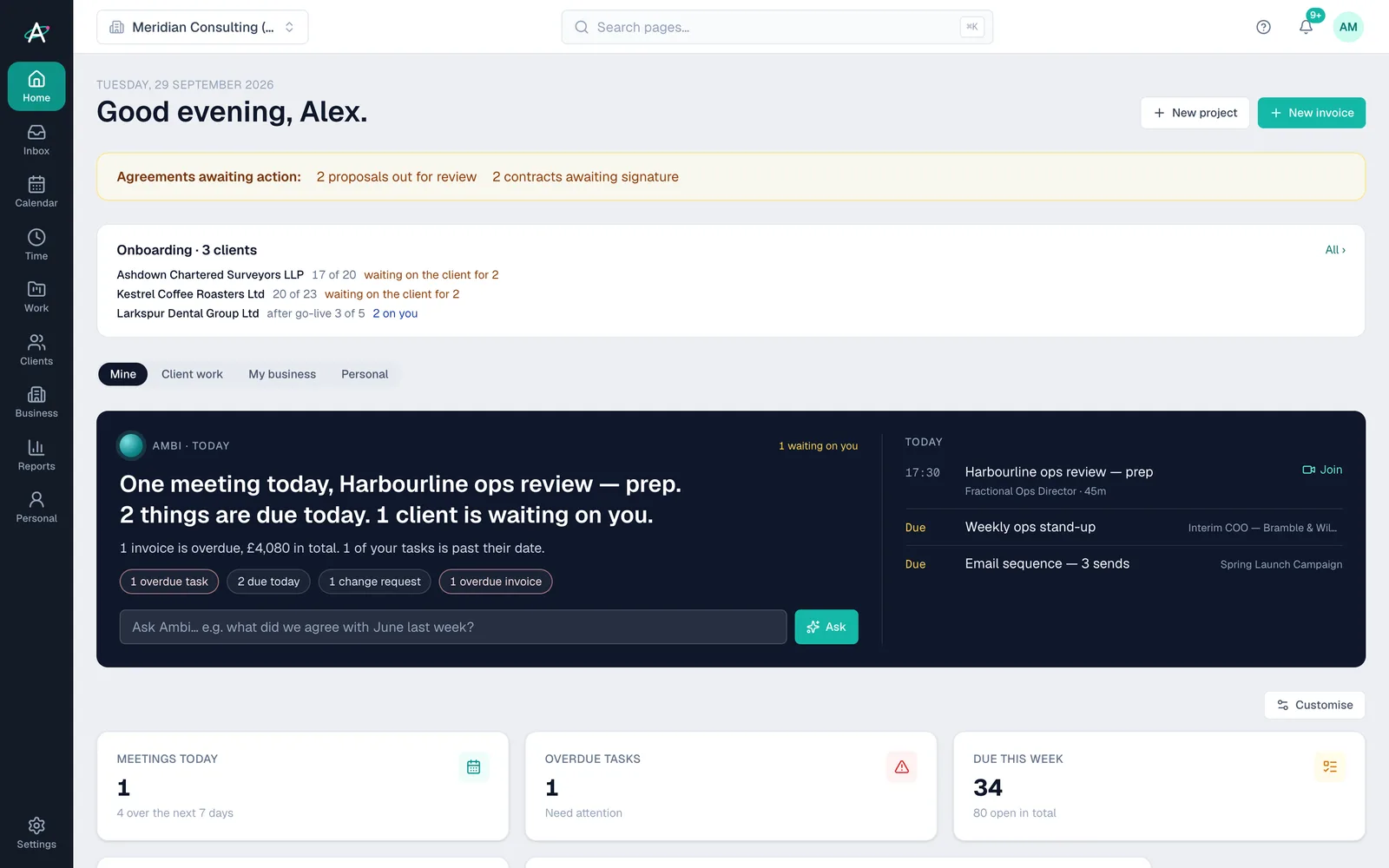
Ambital Home: Ambi's Today brief says there is one meeting today and one client waiting, with an overdue invoice, an Ask Ambi box and the day's widgets below

On a project page

Everything about one project

  • Tasks, phases, milestones, risks and decisions
  • Meeting notes and summaries, with full transcripts of the latest meetings
  • Status updates, project emails, portal messages and approvals
  • Change requests, files, links and invoices
  • Recent activity in linked Slack channels

Anywhere else

Your whole business at once

  • Every project you can open, with its headline numbers
  • Time logged in the last 30 days and your own open tasks
  • Meetings past and upcoming, and red or amber risks
  • Decisions and approvals waiting, and unread emails
  • Pipeline, invoices and this year's forecast, if your seat can see them

How it works

From question to done in four steps

  1. Step 1: Open Ask Ambi

    Use the Ask Ambi button at the bottom right of any page, or the box under your brief on Home.

  2. Step 2: Ask in plain words

    On a project, Ambi answers about that project. Anywhere else it answers about the business, and reads a project in full when you name it.

  3. Step 3: Check what it suggests

    Ask for the tasks from a meeting and you get a list with suggested owners and dates to approve before anything is added.

  4. Step 4: Send it yourself

    Drafts stay drafts. You edit the update and decide when, and whether, a client sees it.

Inside Ask Ambi

What Ambi does for you

Today brief

Home opens on today's meetings, what is due or overdue, who is waiting on you and which invoices are late. On Pro and above Ambi writes it; on Free you get the same facts as plain sentences.
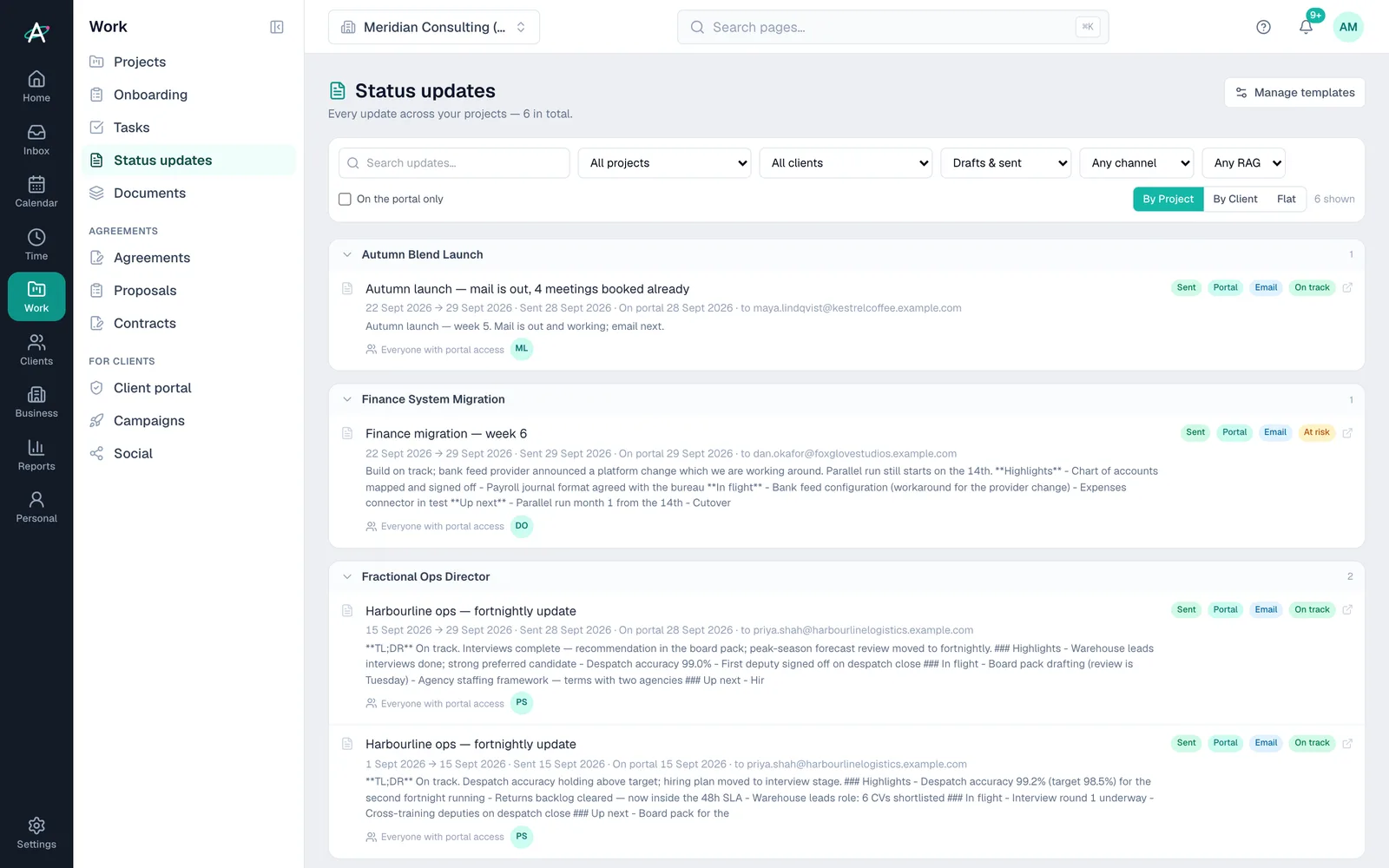
Ambital status updates: fortnightly and weekly updates grouped by project, each marked sent, on the portal, emailed and on track or at risk

Status update drafts

Refresh a draft update from the latest tasks, meetings, emails, risks and hours. Ambi merges in what is new and keeps the lines you wrote.

Meeting actions

Action items from your notetaker come back as clear tasks with a suggested owner, due date and phase, which you apply one at a time.

Risks and decisions

Give a risk a one-line title and Ambi drafts a mitigation plan you can accept or edit. Decisions can be written up the same way.

Each seat's permissions

A teammate's Ambi sees their client work and their own mail and meetings, not the business's money or pipeline unless their seat allows it.

Your own key, if you prefer

Connect your own Anthropic or OpenAI key in Settings and the monthly allowance no longer applies. The provider bills you directly.

Plans

Which plans include Ask Ambi

What each Ambital plan includes for Ask Ambi
FeatureFree · £0Pro · £39Business · £59Business Pro · £79Teams · £150
Ask Ambi and AI drafting, with a monthly allowanceIncludedIncludedIncludedIncludedIncluded
Ambi writes your daily Home briefNot includedIncludedIncludedIncludedIncluded
AI Boost: another million tokens for £5 a monthNot includedIncludedIncludedIncludedIncluded

Compare every feature by plan →

Questions about Ask Ambi

Before you ask

Is Ask Ambi included in my plan?
Yes. Every plan includes a monthly AI allowance: 100,000 tokens on Free, 1 million on Pro, 2 million on Business, 3 million on Business Pro and 5 million shared by the team on Teams. It resets on the 1st of each month.
How far does the allowance go?
A question about a whole project uses roughly 20,000 to 40,000 tokens, and a status update draft far less. Settings shows how much you have used this month.
What happens when I run out?
You can add an AI Boost on any paid plan. Each one adds a million tokens for £5 a month and can be removed at any time. You can also upgrade, wait for the 1st, or connect your own API key.
Does Ambi send anything to my clients?
No. Ambi reads and drafts, but nothing reaches a client until you publish or send it yourself.
Can a teammate use Ambi to see figures they shouldn't?
No. Ambi follows each seat's permissions, so a seat that cannot open invoices, the CRM or the Business area does not get those figures from Ambi either.
Which AI model does Ambi use?
The included allowance runs on Claude, from Anthropic. If you connect your own key, you can run Ambi on Anthropic or OpenAI instead.
When is my data sent to the AI provider?
Only when you ask something. Nothing is sent until you press send, and only the information needed for that question goes with it.

What you are looking at

  1. Home opens on Ambi's Today brief for Tuesday 29 September: one meeting today, the Harbourline ops review prep, and one client waiting on you.
  2. Under the headline: one overdue invoice of £4,080, one overdue task and one change request.
  3. The Ask Ambi box sits below the brief, with today's meeting and its Join link alongside.
  4. Below the brief are the widgets: meetings today, overdue tasks, work due this week, unfiled meeting notes and this week's meetings.

Ask your first question on the Free plan

Ambital is in private beta. Apply to test and you'll get in first, with free months at launch for committed testers.

Free plan · No card required · Built in the UK